Why the calendar invite deserves better AI help than the meeting summary
6 min read
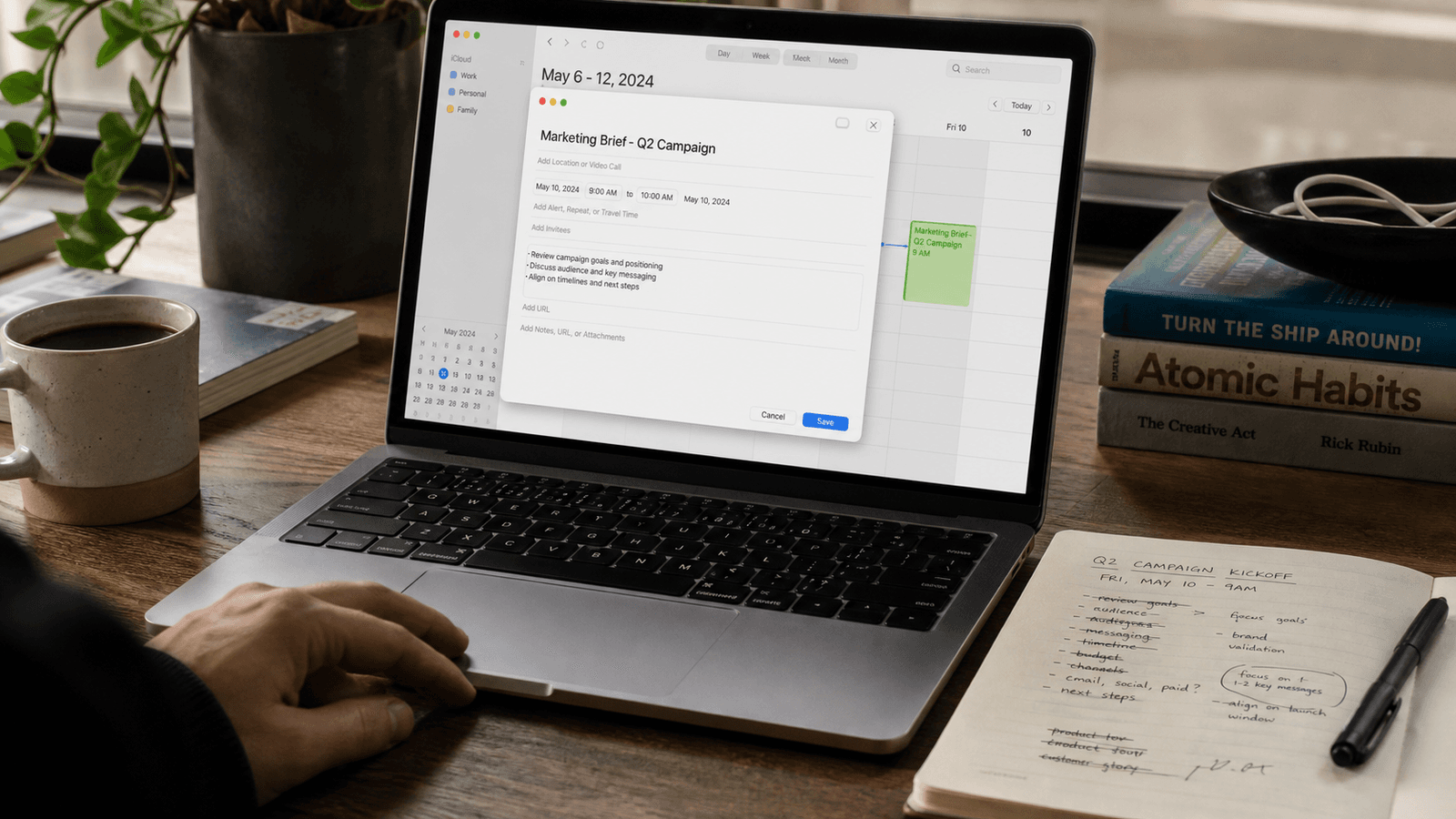
People treat the calendar invite like admin.
Pick a time. Paste a link. Move on.
That misses what the invite is actually doing.
A good calendar invite does not only reserve thirty minutes. It frames why the meeting exists, what the other person should expect, and how prepared everyone will be when the call begins.
In other words: it is writing.
And it is one of the clearest examples of why better AI help often belongs inside the sentence rather than after the meeting ends.
The invite often decides whether the meeting starts well
By the time a lot of people think about writing help for meetings, they are already thinking about notes.
Summaries. Action items. Transcripts. Recaps.
Those can be useful. They also happen after the expensive part.
The invite is where the first layer of judgment shows up.
It decides things like:
- whether the title sounds vague or specific
- whether the agenda is light enough to scan but strong enough to guide
- whether the meeting sounds collaborative, urgent, routine, or corrective
- whether attendees arrive with the right context
- whether the ask feels worth thirty minutes of somebody's day
That is not administrative filler. That is the start of the work.
Bad invite writing creates problems that no summary can fix
Most bad meetings do not begin when someone joins the call. They begin when the invite leaves too much unsaid.
The title is mushy. The description tries to cover everything. The agenda is either missing or so broad that nobody knows what matters. The tone is slightly off, so the meeting sounds lower-stakes or more confrontational than intended.
That leads to familiar downstream messes:
- people arrive unprepared
- the wrong person accepts
- someone assumes the goal is status when the goal is a decision
- the meeting becomes longer because the context setting had to happen live
- the follow-up grows because the meeting started fuzzy
This is why the writing inside the invite matters so much.
It is a small text box with outsized leverage.
The writer usually already knows the meeting they are trying to create
This is another reason the problem fits autocomplete well.
Most people are not stuck because they have no idea what the meeting is about. They are stuck because the wording has to do several jobs at once:
- sound clear without sounding heavy
- give enough context without turning into a memo
- make the purpose legible without over-explaining
- help the meeting feel intentional instead of reactive
- set expectations without creating a document nobody will read
That is not a blank-page problem.
It is a phrasing problem. More specifically, it is a live-field problem. You feel the same pressure in a stalled thread that needs one clear sentence, where taking a suggestion word by word can make the next reply easier to send.
The writer is already inside the calendar invite. They can see the attendees. They can see the time. They can feel whether the subject line sounds too soft or the agenda sounds too sprawling.
That is exactly the kind of moment where inline help makes more sense than leaving for another tool.
Meeting-summary AI solves a later job
There is nothing wrong with meeting summaries.
They help with recall. They help with distribution. They help when the conversation already happened and somebody needs the short version.
But they solve a later job.
They do not help you:
- tighten the invite title before it goes out
- turn a messy objective into three clean agenda bullets
- write a note that tells people what to bring
- soften a rescheduled meeting without making it sound optional
- make the ask specific enough that the right people show up ready
That is why invite writing is such a good stress test for AI writing tools.
If the product only helps after the call, it is missing one of the earliest and most repeated writing decisions around meetings.
Better help stays in the apps where the writing actually happens
Calendar invites are a good example of Typeahead's broader point.
Real writing work does not live in one obvious place. It moves across email, Slack, docs, browser fields, notes, project tools, and yes, calendar descriptions.
The meeting invite often sits right in the middle of that flow.
You go from:
- a Slack thread where the issue surfaced
- to a note where you sketch the talking points
- to the calendar field where you need a clean title and agenda
- to the follow-up message that confirms the context
If the AI help requires a separate drafting surface, that is one more detour in a job that is supposed to take ninety seconds.
Inline help fits better because the writer can keep moving inside the actual field that matters.
They can accept a phrase, reject it, or take it word by word until the invite sounds like something they would really send.
This is also a control problem, not only a speed problem
Meeting invites carry more social signal than people think.
The wording tells attendees what kind of meeting this is.
Is it a brainstorm? Is it a decision? Is it a correction? Is it a quick sync that should stay light? Is it a discussion that needs preparation?
That is why people often dislike generation-first AI for this kind of writing.
It can produce something polished without preserving the exact calibration the human wanted.
The invite may sound competent while still sounding wrong.
Autocomplete is more trustworthy here because the human stays in charge.
They are still the one writing. They are still the one deciding whether the meeting should sound sharper, calmer, narrower, or warmer. The tool is helping the sentence land. It is not pretending to own the invitation.
A better invite saves time before the meeting even starts
This is the hidden advantage.
The right sentence in the invite can remove work before the call begins.
It can:
- prevent unnecessary clarifying messages
- reduce time spent re-explaining the goal at the top of the meeting
- make the agenda easier to follow once the meeting starts
- improve who shows up and how prepared they are
- shorten the follow-up because the meeting itself stayed tighter
That is a lot of value for a field most people treat like a formality.
Which is exactly why it is a good use case for AI autocomplete.
The writing is short. The judgment is real. The context is already in front of the writer.
Why this fits Typeahead
Typeahead is an AI autocomplete app for Mac that works across the apps where you already write.
It runs locally on your Mac. Suggestions appear inline while you type. You can accept the full suggestion, take it word by word, or ignore it completely.
That interaction model fits the calendar invite especially well.
When the job is to turn a vague meeting into a clear title and a few useful agenda bullets without leaving the field where the invite is being written, inline autocomplete is a better shape of help than waiting until the meeting is over and generating a recap of what already happened.